Written by Sarah Locknar
Tools for Flow Cytometry Experiment Design
Designing a successful flow cytometry experiment requires considerable effort and skill. Not only must you understand the expected location and expression of different cellular markers, but you must also identify the right combination of antibodies and fluorophores to accurately detect those targets with your chosen instrument. FluoroFinder has developed a suite of tools to simplify and accelerate flow cytometry experiment design, which we’ve summarized here to help you determine how best to accelerate your research.
Antibody Search
Our Antibody Search tool allows you to explore over 3.1 million antibodies and 1,200+ unique conjugates from more than 100 suppliers. Simply enter the name of your target antigen to see all of the antibodies in our database, including vendors and conjugation options. Alternatively, filter your search results on reactive species, host species, and/or validated applications to identify a suitable antibody for your experimental system. Using the Antibody Search tool, you can also group your results by clone to see which clones are the more popular based on citations and available suppliers[EM1] .
Dye Directory
FluoroFinder’s Dye Directory contains information on over 1,200 dyes—a number that is continuously growing. By selecting a specific dye, users can view the excitation and emission spectra, identify optimal laser and filter sets, and find similar fluorophores based on emission, as well as discover common applications for the product in question. Our Dye Directory also includes filters that let you define your chosen excitation and emission ranges, potentially revealing fluorophores that were previously unfamiliar to you.
Cell Types
FluoroFinder’s Cell Types tool is intended to guide protein marker selection for identifying distinct cell populations, and eliminating other cells from the analysis. Depending on the cell type being investigated, such markers could include cell surface proteins, intracellular proteins, and functional measures like cytokines and transcription factors. Users can leverage a range of options, listed below, each of which provides an interactive image with links to relevant antibodies, as well as includes gate logic and a comprehensive list of references, along with OMIPS where applicable.
- General immune subsets. Human lymphoid and myeloid cell subsets in peripheral whole blood.
- T cell subsets. Conventional and unconventional T cell subsets in peripheral blood and secondary lymphoid organs.
- B cell maturation. Human B cell maturation in bone marrow and peripheral blood.
- T cell maturation. Human thymocyte progenitors in thymus and peripheral blood.
- Hematopoiesis. Human hematopoietic stem cells (HSC) and progenitors in bone marrow.
SpectraViewer™
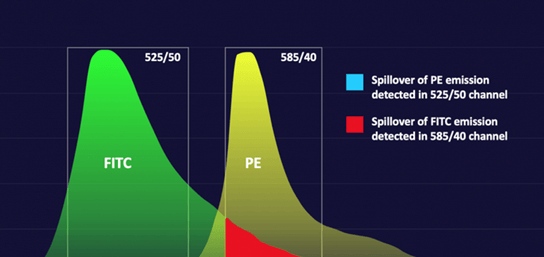
FluoroFinder’s Spectra Viewer enables you to visualize and compare the spectral properties of more than 1,200 dyes alongside instrument-specific laser and filter configurations. Simply select your flow cytometer from the drop-down menu to see the available laser lines, then click the ‘multi-laser’ option to view the detection channels. Next, add fluorophores to the viewer to learn how they will be detected on your instrument. For spectral flow cytometry, the spectra viewer generates a spillover matrix[EM3] and associated complexity index [EM4] to help minimize data spread and improve panel design. And, to help address autofluorescence, you can view a growing library of autofluorescence spectra, uploaded by our extensive community of users.
Panel Builder
Our Panel Builder tool lets you streamline your flow cytometry experiments with optimal fluorophore choices, identifiable via an intuitive series of steps. First, name your panel and select your species. Then choose your flow cytometer, either from your core facility or a generic list, customizing the available lasers and filter sets if required. Next, add your antigens (assigning antigen densities where desired) and supplementary reagents, such as viability dyes, fluorescent proteins, and structural probes—this can be done manually, by copying and pasting a list from Excel, or by selecting and editing an existing panel, including OMIPs. Lastly, pick products from the generated lists, using the integrated Spectra Viewer and complexity index (where applicable) for guidance, and obtain a quote any necessary reagents.
While our Academic Basic Panel Builder tool is free to use, FluoroFinder recently released IntelliPanel™ 2.0, the latest evolution of its flow cytometry panel design software. Building on the capabilities of the original Panel Builder, IntelliPanel™ 2.0 helps researchers design high-confidence panels faster through automated, instrument-aware optimization, real-time commercial reagent data, and inventory-aware workflows. Researchers can validate panel designs against instrument specifications, reagent availability, and existing laboratory inventory to reduce unnecessary purchases, minimize reagent waste, and improve experimental efficiency.
IntelliPanel™ 2.0 also introduces collaboration features that enable research teams, core facilities, and laboratories to work together throughout the panel development process. Unlike vendor-specific panel design tools, IntelliPanel™ 2.0 remains supplier agnostic, allowing researchers to design panels using commercially available reagents from a broad ecosystem of suppliers. Combined with machine learning-driven fluorophore recommendations, integrated purchasing workflows, and expert-backed guidance, IntelliPanel™ 2.0 helps scientists increase first-pass panel success, improve reproducibility, and move seamlessly from experimental planning to execution.
eLearning
FluoroFinder has developed a broad range of eLearning programs, covering both traditional and spectral flow cytometry, as well as cell sorting. Our eLearning material is delivered as subtitled video-based content and simulation, suitable for everyone from beginners to advanced users, and is widely utilized by core facilities for training and education purposes. All of our eLearning modules are available through our Plus packages. For help with selecting the best option for your facility, please get in touch.